
MFT as an API
Secure, multi-protocol file exchange via a simple REST interface
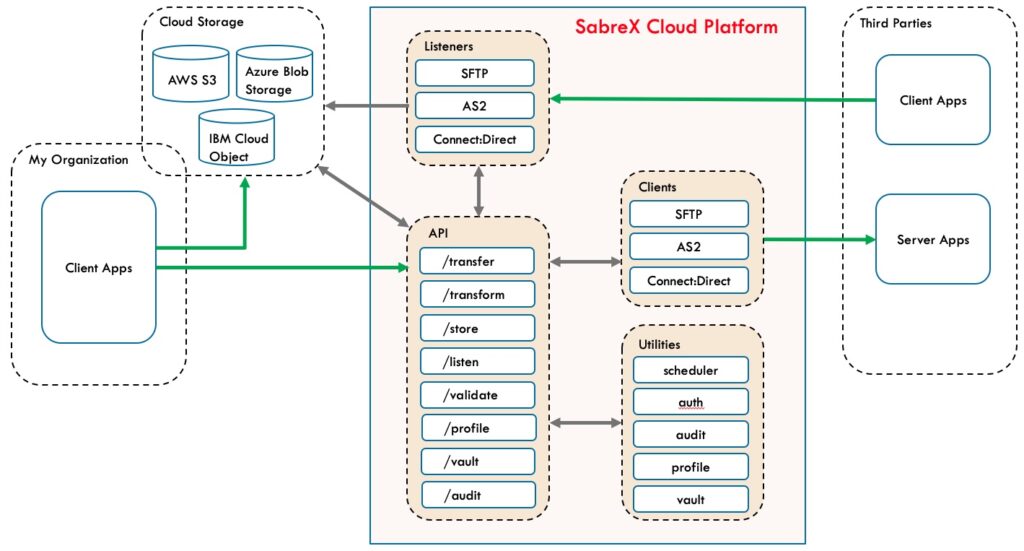
Use a unified API to exchange files with partners across Connect:Direct, SFTP, and AS2 — without running the infrastructure. Define endpoints, initiate transfers and monitor status
Key capabilities
- Unified transfer API for C:D, SFTP, AS2
- Partner & endpoint management with RBAC
- Scheduling & retries with policy templates
- End-to-end audit with tamper-evident logs
- Dashboards & alerts for operations teams
Protocols & compatibility
| Connect:Direct | NDM sessions with partner nodes, copy files, run tasks and jobs |
|---|---|
| SFTP | Key-based auth, cipher policy control, inbound/outbound flows |
| AS2 | Signed/encrypted messages, MDNs, trading partner profiles |
| Regions | UK, EU, US (data residency options) |
| Compliance | Audit trails and retention rules |
Common API objects
vault— credentials and key storageprofile— partner connection details (protocol, address, defaults)transfer— a single file movement with source/target and profiletransform— map, decrypt and encrypt filesaudit— filter and report on activities
Security model
- OAuth 2.0 Client Credentials or API keys scoped to tenant and role
- Per-tenant isolation; optional IP allowlists and mutual TLS (where applicable)
- Encrypted storage & TLS 1.3 in transit
Sample flows (cURL)
Illustrative examples — paths and fields are representative.
# 1) Create a partner profile (SFTP)
curl -X POST https://api.sabrex.cloud/v1/profile/sftp \
  -H "Authorization: Bearer <token>" \
  -H "Content-Type: application/json" \
  -d '{
    "name":"acme-sftp",
    "host":"sftp.acme.example",
    "port":22,
    "auth":{
    	"type":"ssh-key",
    	"username":"acme",
    	"publicKeyId":"key_123"
    }
  }'

# 2) Submit a transfer (SFTP → Partner)
curl -X POST https://api.sabrex.cloud/v1/transfer/sftp-put \
  -H "Authorization: Bearer <token>" \
  -H "Content-Type: application/json" \
  -d '{
    "name":"invoice-2025-10-20",
    "source":"ACME-1-S3://invoices/inv001.pdf",
    "destination":"ACME-inv001.pdf",
    "profile":"acme-sftp"
  }'
Onboarding in three steps
- Register your tenant and obtain credentials
- Define vaults and profiles
- Integrate the transfer APIs into your workflow
Most customers connect initial partners in hours, not weeks.
Service & operations
| Availability | HA deployment, 99.9% SLA |
|---|---|
| Monitoring | Real-time dashboards, alerts, audit exports |
| Support | Business hours (standard) • 24×7 incident (premium) |
| Data residency | UK / EU / US options |
| Pricing | Per-tenant base + usage (transfers/GB) • volume tiers |
Next steps
Pilot with one partner — scale to many with confidence.
Solution architects available for migration planning and protocol policy design.